


Are you wondering how to effectively ensure code quality in large frontend projects? In this article, you will learn how static code analysis can help you quickly detect problems, maintain consistency, and effectively manage technical debt in your application. You will learn practical ways to implement ESLint into your daily work, what to look out for, and how to automate processes to save time and energy during code review. As a Senior Angular Software Engineer at XTB, I work every day to maintain high code quality, and I know how important proven tools and best practices are. You can implement them too – right after reading this article!
Are you wondering how to effectively ensure code quality in large frontend projects? In this article, you will learn how static code analysis can help you quickly detect problems, maintain consistency, and effectively manage technical debt in your application. You will learn practical ways to implement ESLint into your daily work, what to look out for, and how to automate processes to save time and energy during code review. As a Senior Angular Software Engineer at XTB, I work every day to maintain high code quality, and I know how important proven tools and best practices are. You can implement them too – right after reading this article!
How to Ensure High Code Quality in Your Project
Maintaining high code quality in large projects is a real challenge. Especially when many developers work in a single repository, chaos and errors can easily arise. You are probably wondering how to effectively ensure code quality in your team. A thoughtful approach to this topic not only means fewer problems in the future, but also faster project development.
First and foremost, it is essential to establish a clear set of best practices and guidelines that the team will follow when writing code. However, simply documenting these rules is not enough. In practice, written agreements alone quickly prove insufficient - they are difficult to enforce, and mistakes are easy to make, especially within large, dynamic teams.
Static code analysis is a fast and repeatable method of automatically checking code quality that does not require manual review of each line, but is performed using a specific tool. This tool analyzes the code for you – objectively and without emotion. This allows you to focus on more important tasks, such as verifying business assumptions or developing new features.
In large, long-term projects, maintaining high code quality and consistency is crucial. Not only does it facilitate the implementation of new features, but it also significantly reduces cognitive load. New team members find their feet in the project faster, and returning to older pieces of code becomes less problematic.
I’d like to introduce a tool that I personally use and can confidently recommend.
ESLint - an Essential Tool for Static Code Analysis
ESLint is one of the basic tools for static code analysis in JavaScript-based projects. With the right parsers, ESLint can analyze not only JavaScript files, but also TypeScript, HTML, CSS, and JSON, converting them to AST (Abstract Syntax Tree), which allows for effective code quality control. If you work with Angular, you can easily add ESLint to your project with a simple command (`ng add angular-eslint`) and immediately lint TypeScript and HTML files.
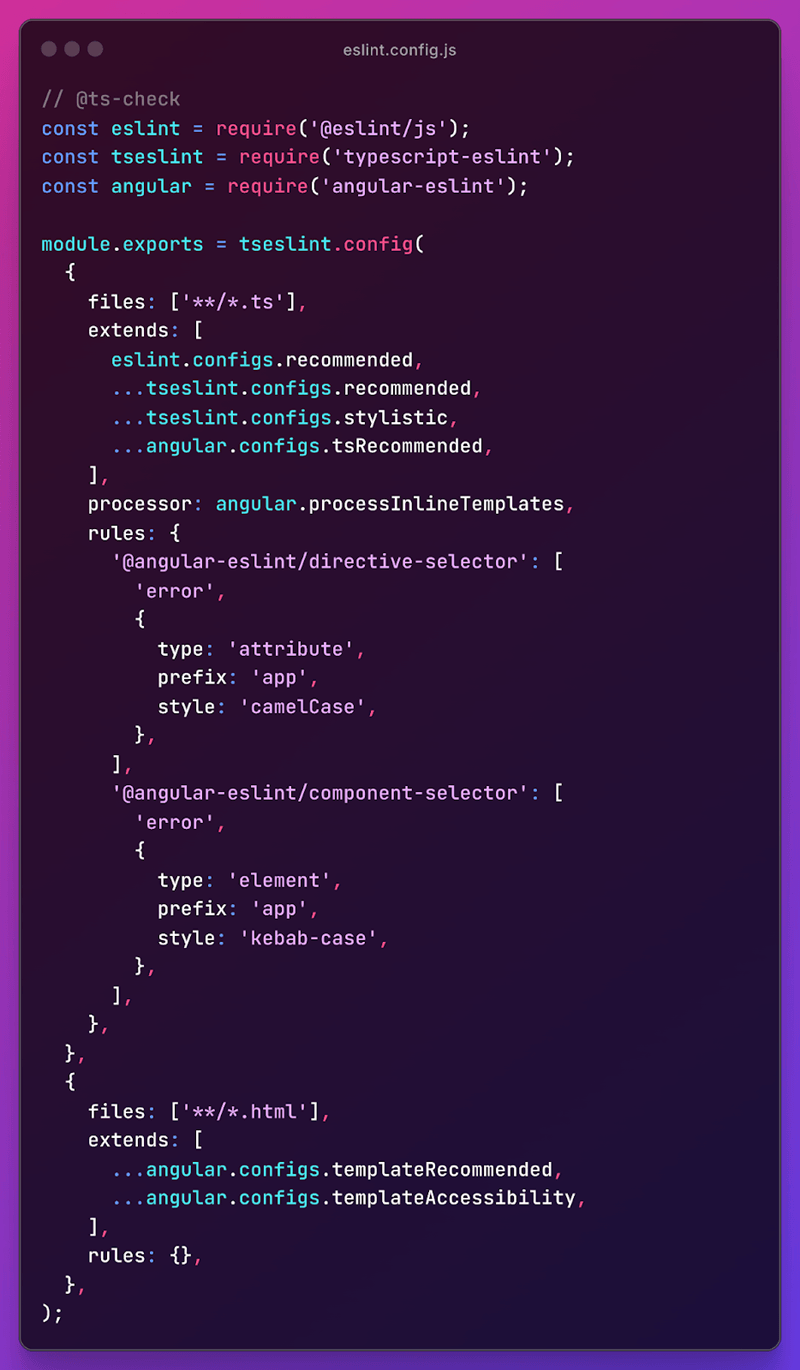
The most important element of ESLint configuration are rules, which define the principles governing code quality and style. Each rule can be set as a warning or an error, allowing you to clearly distinguish between less significant and critical issues. You can also specify precisely which rules should apply to specific file types. In practice, ready-made rule sets are most commonly used, such as those from the angular-eslint package, which offer various configurations – for example, recommended or stylistic. These sets can be easily applied and customized to your needs by overwriting selected rules. If the project requires it, you also have the option to create your own custom rules.
The results of static code analysis in ESLint can be presented in various formats, which can be selected using the `format` parameter. A text report works great for local work or in the CI (Continuous Integration) process, while the JSON format allows for further processing of the results, for example, into custom reports. It is a good idea to prepare two ESLint configurations: one for local work, where you report all issues in detail, and another for the CI process, where you focus only on errors, ignoring warnings. This approach allows you to effectively manage code quality at every stage of project development.
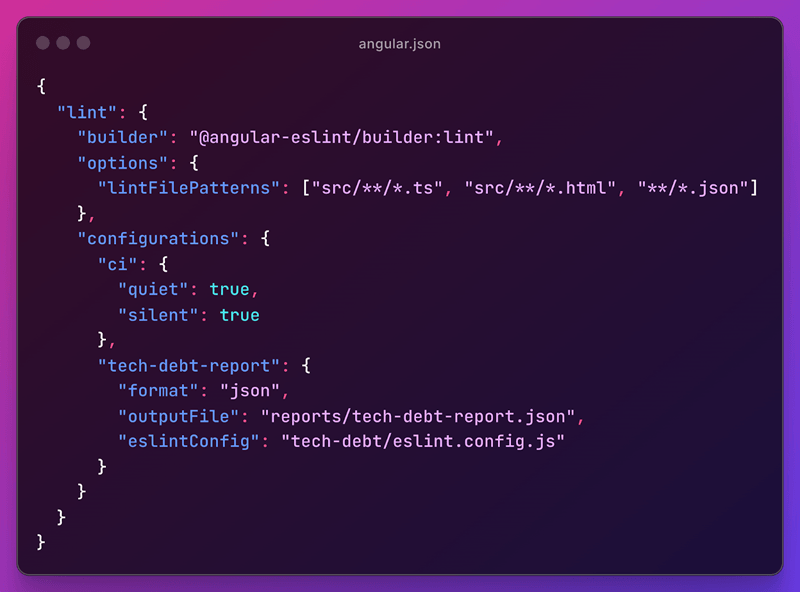
Definition of a lint task with different configurations for an Angular project
Monitoring Essentials for High-Quality Code
ESLint configuration allows you to enforce many good programming practices at a basic level. For example, you can ensure that you use block-scoped variables (`const` and `let` instead of `var`), which minimizes the risk of name collisions, among other things. ESLint will also point out unused variables, helping you avoid unnecessary memory allocation and keeping your code clean. In the case of TypeScript, it is particularly important to block practices that lower code quality, such as using the `any` type or the `non-null assertion` operator. This keeps the code typed and safe, which greatly facilitates its development and maintenance.
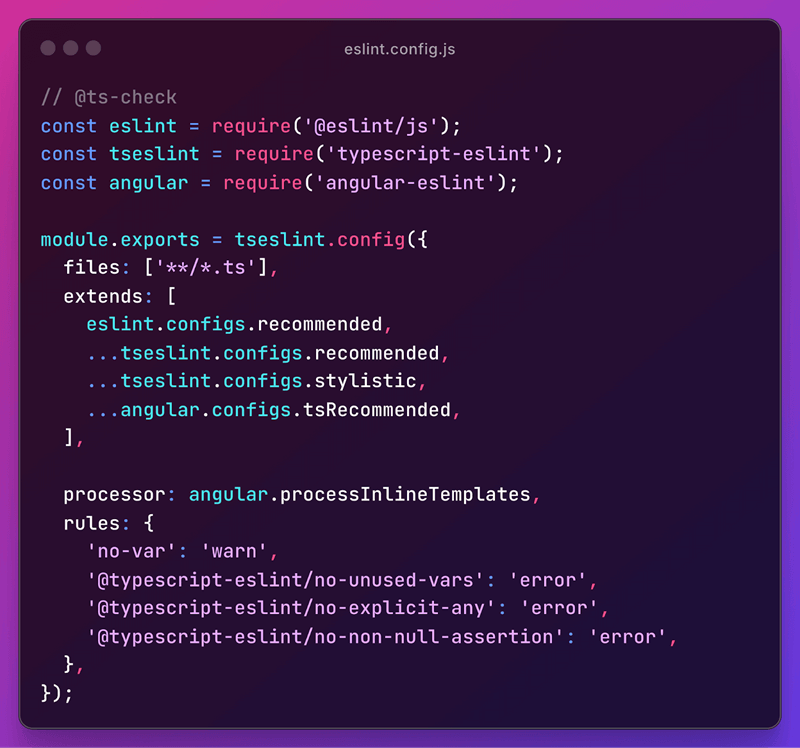
ESLint configuration for TypeScript files
In addition to basic rules, ESLint allows you to enforce your preferred programming style. For example, the stylistic configuration promotes the use of modern constructs such as `for...of` loops. For more demanding projects, consider the rules from the Airbnb package, which cover a wide range of best practices and code style.
ESLint allows you to take care of more than just JavaScript and TypeScript code. In HTML files, you can enforce good practices, such as explicitly specifying the `type` attribute for buttons or the presence of the `alt` attribute in images, which improves the accessibility of your application. The quality of unit tests can be controlled with dedicated plugins such as eslint-plugin-jasmine. In addition, using extensions, you can monitor the quality of JSON files (eslint-plugin-json) and, as has recently become possible, CSS files as well. This allows you to ensure the consistency and high quality of the entire project, regardless of file type.
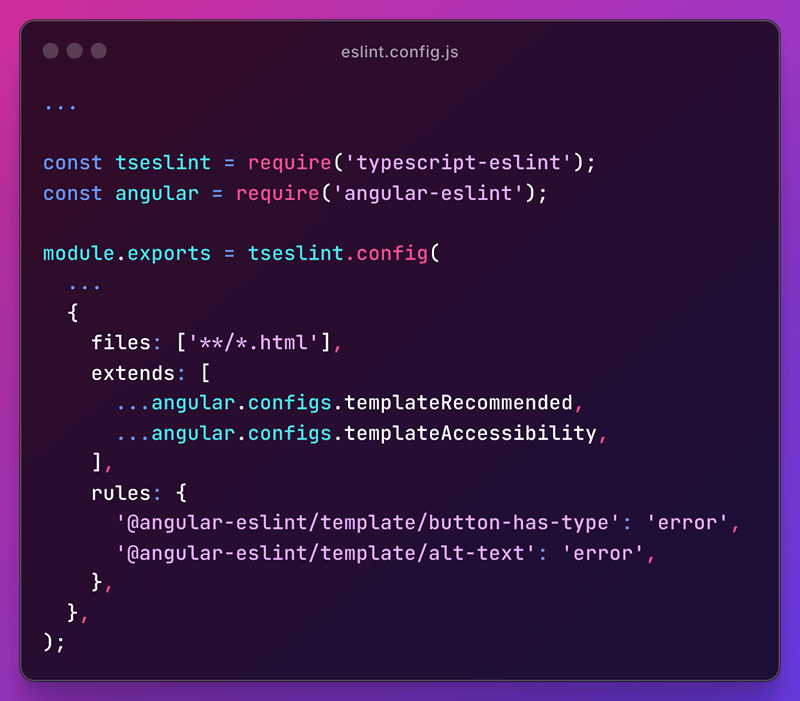
ESLint Configuration for HTML Files
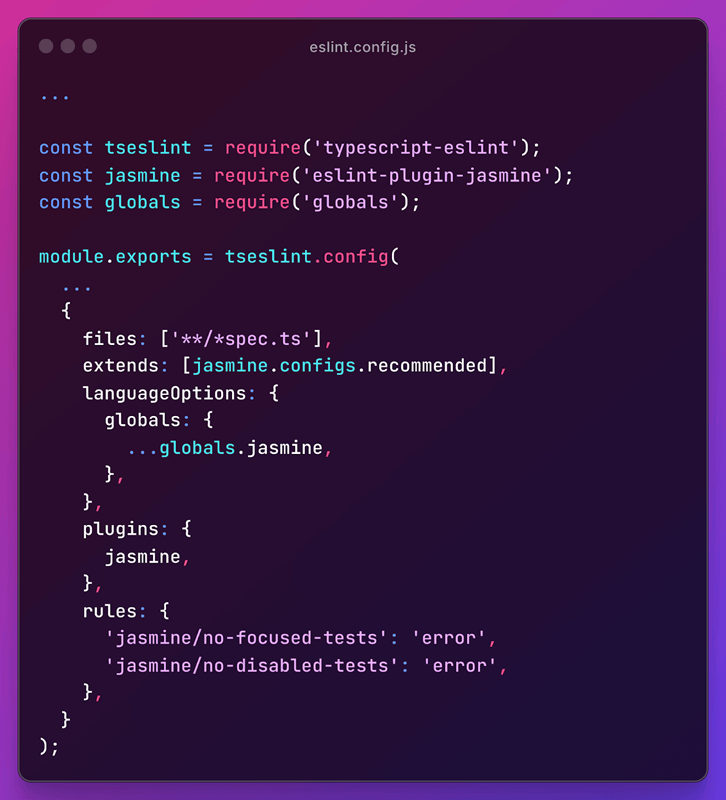
ESLint configuration for Unit Tests
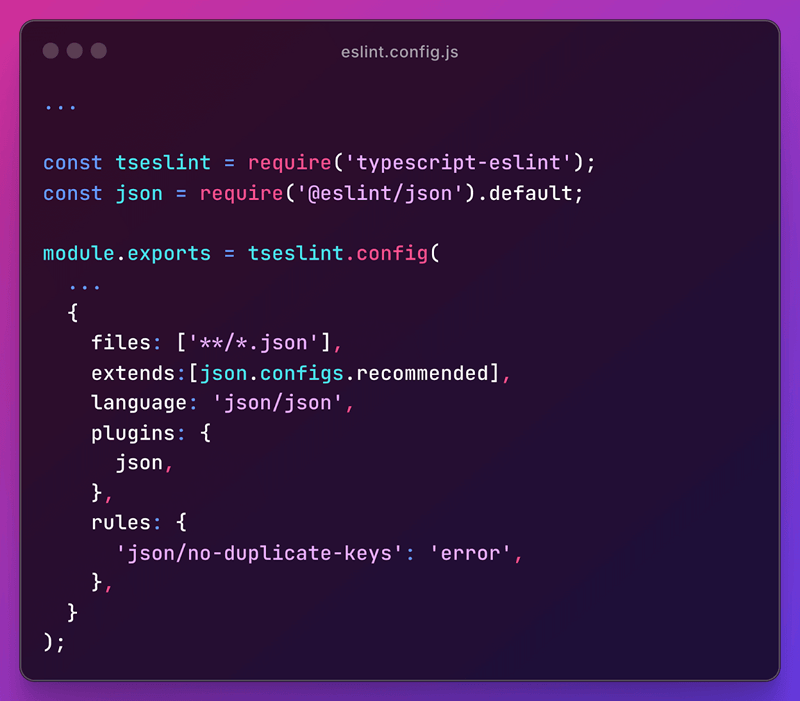
ESLint Configuration for JSON Files
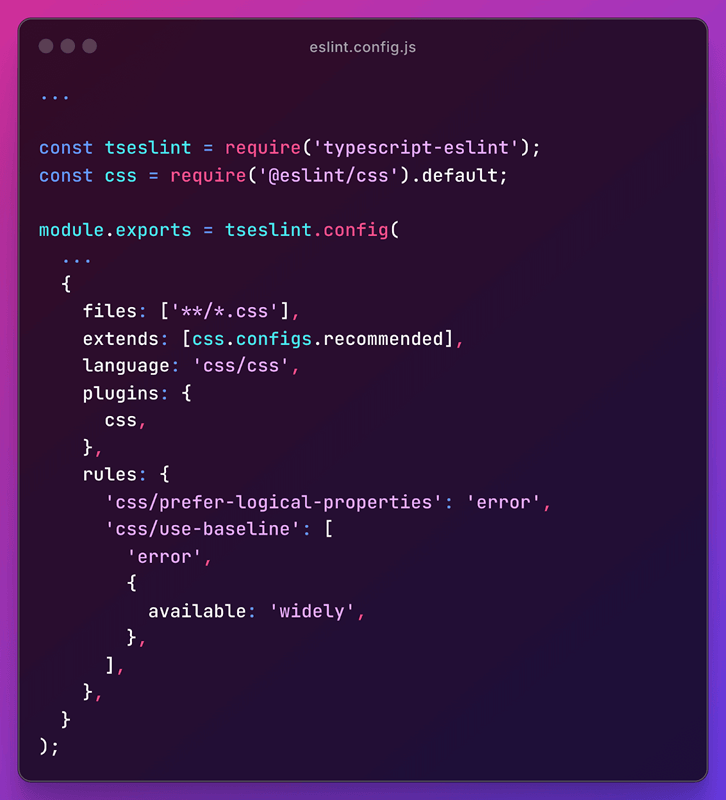
ESLint Configuration for CSS Files
Monitoring Technical Debt with ESLint
One of the key aspects of ensuring code quality is monitoring technical debt. With ESLint, you can easily detect the use of outdated code fragments marked as deprecated in JSDoc comments. This applies to both external libraries and your own modules in the project. Simply apply the `no-deprecated` rule to quickly identify potential sources of problems in static analysis reports.
ESLint also encourages developers to use current standards and new syntax in libraries and frameworks. For example, Angular provides rules in the angular-eslint packages that enforce the use of modern solutions, eliminating older practices from before the “Modern Angular” era.
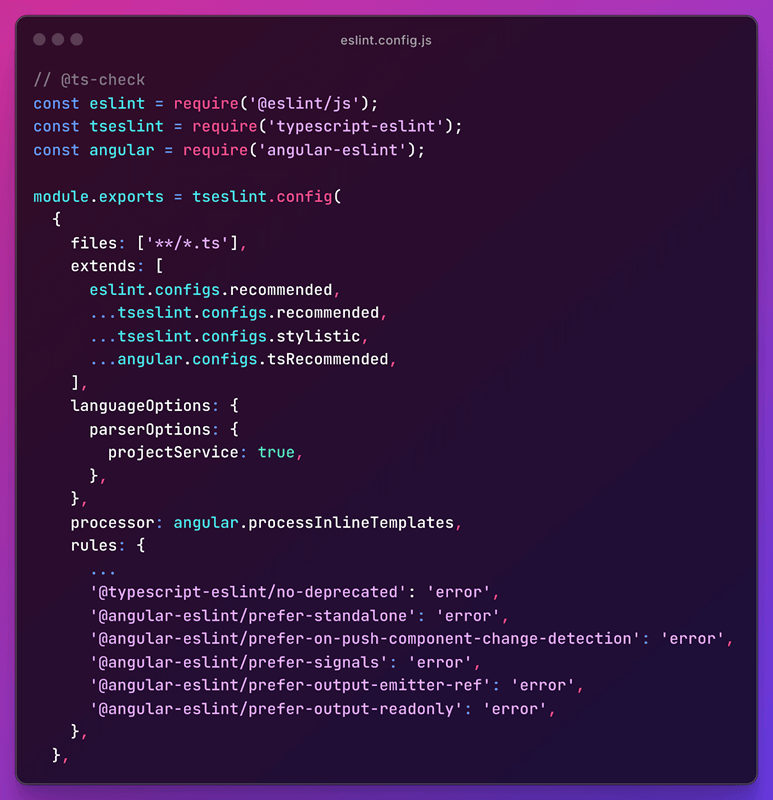
ESLint Configuration for Monitoring Technical Debt
With the right configuration, you can force components to be created in standalone mode and ready for use in a zoneless environment. In addition, you promote the use of Angular Signals instead of traditional decorators, and in component templates, you ensure the use of new, native syntax and best practices that improve code readability. Implementing modern solutions brings many benefits: it increases the capabilities of the project, improves performance, and enhances the developer experience. What's more, older techniques become deprecated over time, and their continued use leads to technical debt, which can hinder the development and maintenance of applications in the future.
Integrating ESLint into the Development Process
To effectively ensure code quality, it is worth integrating ESLint into the daily development process. Static code analysis allows you to quickly detect problems that can negatively affect the quality of your application. It is best when ESLint works directly in the developer's IDE – for example, in VSCode, all you need to do is install the ESLint extension, which keeps you informed about errors and suggests how to fix them.
In projects using Git, it is worth implementing so-called git hooks, which automatically run linting before pushing changes to the repository. The final verification takes place in the CI (Continuous Integration) process, where ESLint works with a dedicated configuration. Platforms such as GitLab allow you to integrate linting results with the user interface, presenting clear code quality reports.
Introducing new rules into an existing project requires a thoughtful approach. Immediate correction of all violations can be difficult due to their number, the complexity of the changes, or time pressure. A good solution is to set the new rule as a warning for existing violations and as an error for new changes. This allows you to gradually improve code quality without blocking the team's work. At the same time, it is worth generating reports in JSON format to monitor progress in eliminating technical debt. An example rule implementation process:
- Add a rule with an error level.
- For files with violations, set it as a warning so that developers see warnings in the IDE.
- Generate JSON reports regularly to track progress.
Reports can be customized to the team's needs, for example by grouping issues by team based on the codeowners file. Tracking trends over time allows you to effectively manage code quality and technical debt.
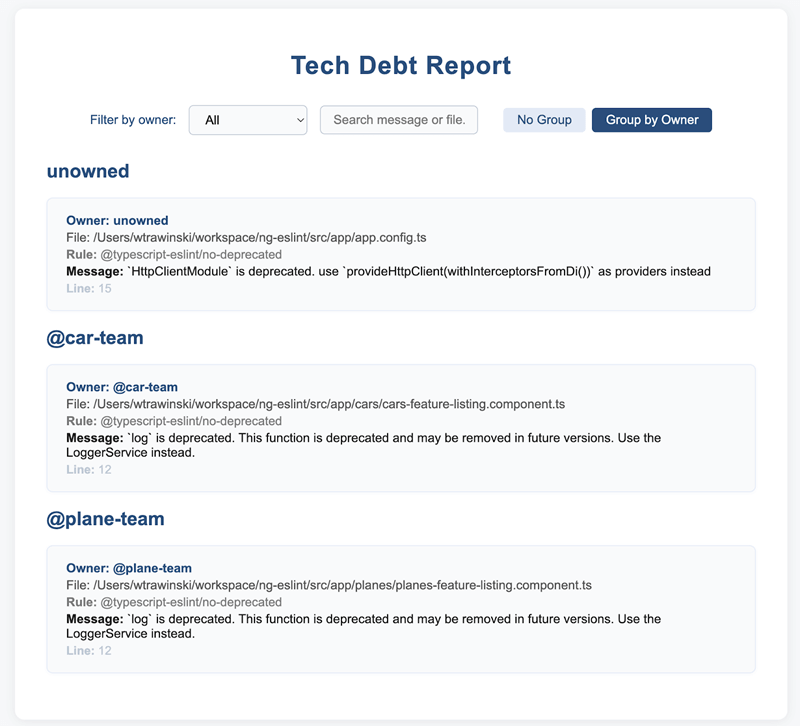
Application for managing a technical debt report
Summary
In summary, static code analysis provides a dependable way to maintain high quality and consistency in frontend projects. Tools like ESLint make it easy to catch errors early, enforce best practices, and keep technical debt under control. By integrating ESLint with your IDE, git hooks, and CI pipeline, you turn quality control into an everyday habit rather than a one-off task.
If you want your team to work efficiently and your code to be high-quality, readable, and easy to maintain, start by implementing ESLint and adjusting the configuration to your needs. Do you have questions or your own experiences with implementing static code analysis? Share them in the comments or reach out to me on LinkedIn – I'd love to exchange insights!

Wojciech Trawiński
Reactive Programming in Java: Insights, Traps to Avoid, and When It Truly Shines
Senior Java Developer in a Cross-Technology Team: Real-World Lessons & Insights
Improvisation as the Key to Effective Meetings: A Practical Guide for Facilitators
QA Specialist: What Software Quality Assurance Really Entails
